
Keypad, Remote, or App: Which One Actually Opens It Faster?
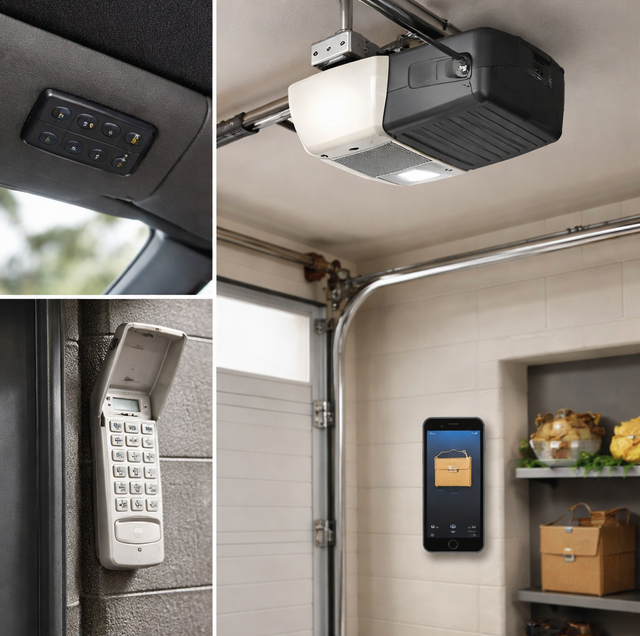
Chances are you already have two of these three within reach right now: a visor clicker riding in the car you don't drive as often, an app you downloaded once and forgot about, maybe a keypad code you gave a dog walker two years ago and never changed. Most households end up owning all three without ever deciding which one is actually best; they default to whichever one happens to be closest at the moment.
That's worth a second look, because a visor remote, a wireless keypad, and a smartphone app are not three flavors of the same trick. Each reaches the opener by a different path, and the path decides how fast it responds, what it needs to keep working, and how it fails. Picking the right one, or the right combination, starts with what happens between your hand and the motor on the ceiling.
How Does a Visor Remote Open the Door?
A visor remote is a small radio transmitter, nothing more. Press the button, and it broadcasts a short-range signal, typically in the 300 to 390 MHz band, directly to a receiver built into the opener's logic board. There is no middleman: no network, no account, no server checking the request before it is allowed through. The board reads the code embedded in that signal, compares it against what it has stored from when the remote was first programmed, and if it matches, the motor engages.
Almost every remote made in the last few decades uses a rolling code. Instead of broadcasting the same fixed sequence every time, which anyone with a code-grabbing scanner could eventually copy, the remote and receiver run the same algorithm and agree on a new code with each press. That is why an old universal remote with a bank of tiny dip switches will not pair with a modern opener: dip-switch systems used a fixed code and were phased out for exactly the vulnerability rolling code was built to close.
Because the whole exchange happens over local radio, it works instantly and regardless of whether the internet is up. Its only real dependency is the small battery inside it, commonly a 12-volt or 3-volt cell depending on the model, which draws almost no power while sitting idle and typically lasts one to two years of normal use before it needs replacing.
How Is a Wireless Keypad Different From a Remote?
A keypad uses the identical RF path. Enter the code, and it broadcasts the same kind of rolling-code signal a remote would, straight to the logic board, no cloud involved. The difference is not the radio technology; it is what triggers the transmission and where the device lives.
A remote is a token you carry: lose it, and you lose access until it is reprogrammed or replaced. A keypad is fixed to the wall outside the garage, usually near the door frame, so there is nothing to misplace in a bag or leave in a car that gets sold. That also means it lives outside: sun bleaching the housing and drying out the rubber gasket around the buttons, humidity working into the battery contacts, and, at arm's reach on an exterior wall, a target for prying rather than picking. An outdoor-rated keypad answers some of that with a sealed rubber face, but it is still living outside in a way a remote in your car never has to.
How Does a Smart App Get the Signal to the Opener?
This is where the mechanism changes, not just the housing. A remote or keypad talks straight to the receiver. A smart app talks to a Wi-Fi radio, built into newer openers or added through a small hub wired to the opener's control terminals, and that radio joins your home network the same way a laptop or a thermostat would. Tap the button in the app, and the command does not go straight to the door. It travels from your phone up to a cloud server and back down to the Wi-Fi radio sitting in your garage, which then triggers the same motor a remote would.
That round trip is short, usually well under a second, but it is not instant the way a direct radio signal is. A half-second of lag between the tap and the door moving is normal, the price of a message making two hops instead of zero. The payoff for that lag is range: the app has no line-of-sight or distance limit the way a remote does, because it is not relying on radio strength to cover the gap. It relies on both ends having a working connection to the internet, which is a very different kind of reliability than a battery and a receiver.
A remote and a keypad are one-way transmitters shouting on the channel the receiver happens to be listening to: press the button, the message crosses the driveway at the speed radio waves travel, and nothing comes back the other way. An app is closer to placing a call that gets routed through an operator two states away before it reaches that same receiver. Same eventual result, with a stop in the middle that a direct radio conversation never has.
Where Each Method Lets You Down
Every access method has a single point where it stops working, and it is rarely the point people expect.
Remote battery dependency: a remote fails quietly. The battery does not announce it is dying; the button simply stops working the next time you press it. Because it sits inside a case most people never open between replacements, a year can pass without anyone checking it.
Keypad weather and vandalism exposure: a keypad's failure points are physical. Years of direct sun and heat can dry out and crack the rubber gasket that keeps water out of the button contacts, and heavy rain or humidity that finds its way past a worn seal can corrode the terminals underneath. Because it is mounted where anyone walking up the driveway can reach it, it is also the one access method exposed to someone simply prying at the housing, which is why some households add a small locking metal cover over an otherwise exposed keypad.
App connectivity dependency: an app fails when either end of its two-hop path goes down. If your home internet service drops, the phone command never reaches the Wi-Fi radio in the garage, even though the opener itself is running fine. If the opener's own Wi-Fi hub loses power during a storm, the same thing happens from the other direction: the radio has nothing to receive the command with, regardless of how strong your phone's signal is. A remote or keypad sitting on the same opener during either outage keeps working without noticing, because neither one ever depended on that connection in the first place.
Openers with a battery backup on the motor keep running on local remotes and keypads through a power outage. That backup does not extend to the app layer unless the router and modem are on backup power too, which is worth checking separately if remote access matters during an outage.
The Fourth Option Already Bolted to Your Wall
Before any remote, keypad, or app enters the picture, every opener ships with a wired wall control mounted near the door into the house, usually a single button or a small panel with a built-in light switch. It runs on its own dedicated wire straight to the logic board rather than a radio signal, so there's no battery to die and no range to lose: press it, and the connection is as direct as a light switch. Beyond opening and closing the door, most wall controls also carry a vacation lock or lockout mode, a switch that disables every remote and keypad code at once, which is the fastest way to secure the opener during a trip without reprogramming anything, and a light control button, tied to the opener's own bulb rather than the house wiring.
The trade-off is location. A wall control only works from inside the garage, so it solves a different problem than the other three. It can't run low on batteries or lose a Wi-Fi connection, but it's no help getting in from the driveway. Most households never think about it until the remote and keypad go down at once, at which point it's the one still guaranteed to work.
Keypad, Remote, and App: A Side-by-Side Look
| Visor Remote | Wireless Keypad | Smart App | |
|---|---|---|---|
| How it reaches the opener | Direct RF to the receiver | Direct RF to the receiver | Wi-Fi to a cloud server, then back down to the opener |
| Typical response time | Instant | Instant | Roughly a half-second delay |
| Works without internet | Yes | Yes | No; wall button and paired remotes still work, app commands do not |
| Main point of failure | Battery inside the remote | Weathered seal, corroded contacts, or forced entry | Home internet outage or opener's Wi-Fi hub losing power |
| Access from outside the property | No | No | Yes, anywhere there is a data connection |
| What it depends on physically | Not misplacing it | Weatherproofing and mounting security | Router, modem, and opener's Wi-Fi radio all staying powered |
Which One Makes the Most Sense for Your Household?
Plenty of garages run two or three of these at once, and the logic board on nearly every modern opener is built to store more than one remote code alongside a keypad code and an app connection without conflict, so choosing does not have to mean giving something up.
A remote earns its keep for the person who parks, walks in, and closes the door behind them; nothing beats an instant, no-account, no-connection response for that. A keypad solves the exact problem it was built for: getting in without carrying anything, which matters for a household with kids walking home before a parent, a dog walker who needs occasional access, or anyone who has ever left a phone and a wallet both inside the house at the same time. An app earns its place when access needs to extend beyond the driveway: confirming the door actually closed after leaving for work, letting a contractor in without handing over a physical code, or checking on the garage from somewhere the remote's radio was never going to reach.
The households that gain the least from the app layer are the ones a remote and a keypad already serve, where nobody needs to check the door from three states away and half a second of round trip adds nothing the RF signal was not already delivering.
Frequently Asked Questions
The receiver's memory holds a fixed number of paired devices, and once it fills, learning a new remote quietly pushes out the oldest one stored. That is the usual explanation for a remote that worked for years going dead the week after a replacement was programmed. Clearing that memory is all or nothing: holding the Learn button until its indicator goes out erases every remote and keypad code on the board at the same time, so every device in the household has to be reprogrammed in one session. It is worth doing on purpose after selling a car whose built-in HomeLink buttons were paired to the door.
Check the keypad's backlight or status light first, since most units dim or stop lighting up before they stop transmitting entirely, which points to the battery. If the light is working normally but the door still will not respond, try re-entering the exact programmed code slowly, since a worn rubber button pad can fail to register a fast double-press even when the battery is fine.
Yes. If a keypad has been out of range of the receiver for an extended period, such as during a long renovation with the opener unplugged, its rolling code can fall out of sync with the logic board's count. Resyncing usually means holding the learn button on the opener itself and re-entering the keypad's code fresh, the same process used the first time it was installed.
Yes, and this is one of the real advantages over RF-only access. Because the command routes through a cloud server rather than a direct radio link, the phone only needs any working data connection, cellular or Wi-Fi, to reach that server. The garage-side Wi-Fi radio is the one link in the chain that has to stay on the home network specifically.
The code is the weak point more often than the housing. Most keypads let you change the PIN at the keypad without touching the opener, which matters because a code handed to a contractor or a dog walker stays live until somebody changes it, and many units also hold a temporary code that expires after a set number of uses. Worn buttons give a code away as well: on an older keypad the digits in use go shiny while the rest stay dull, which narrows a guess down to a few combinations, so rotating the code spreads that wear around. On the physical side, mounting height does more than most people assume, since a keypad set at eye level under the door frame's overhang catches far less driving rain and direct sun than one bolted flat on an exposed wall.
No, and the distinction is worth knowing. A remote and keypad's rolling code protects against someone intercepting or guessing the RF signal itself. An app has no RF code to guess at all; its security instead depends on your account credentials and, where the platform offers it, two-factor login, since the command never travels as a radio signal anyone nearby could capture.
Count what is already on the door before adding anything to it. Most garages are running two or three access paths plus a wall button nobody thinks about. The four of them fail in different directions on purpose: a dead coin cell never touches the keypad, a cracked keypad seal never touches the app, an internet outage never touches either radio, and the wall button keeps working through all of it. That spread is the point. Whichever one lets you down on a given morning, something else on that opener is still listening.
Find out which access options your current opener already supports — a quick check settles it before you add anything new. Squared Away Garage Door Service serves Cedar Park and Central Texas. Call (512) 456-3781.
