
Is MyQ Worth It? What LiftMaster's Smart App Actually Adds
The garage door goes up from a tap on a phone screen, and somewhere behind you a family member is holding the actual clicker that came with the opener, wondering out loud why anyone would set up an account and an app for something a button clipped to a visor already does. It is a fair question. Answering it honestly means looking past the marketing and at what a MyQ-connected opener is physically doing differently from a standard remote setup, because the two are not the same technology with an app bolted on top.
A standard remote and a MyQ-connected opener solve the "open the door" problem the same way, but everything past that single command diverges. One is a short-range radio conversation between your hand and a receiver bolted to the ceiling, nothing more. The other is a device sitting on your home network, capable of holding a conversation with a server somewhere else entirely, and that difference is what actually changes what the door can do, who can control it, and what you find out about it after the fact.
The Real Difference: A Local Radio Signal vs a Networked Device
A wireless remote or keypad talks to your garage door opener over RF, radio frequency, in a straight conversation that never leaves your driveway. Press the button; the signal reaches the receiver built into the opener's logic board, the board checks the rolling code against what it has stored, and the motor engages. That link works whether or not you have internet service, because it does not need any. Range is limited to roughly the distance a hand-held transmitter can throw a signal, and the opener has no way to tell you anything back beyond a light or a beep.
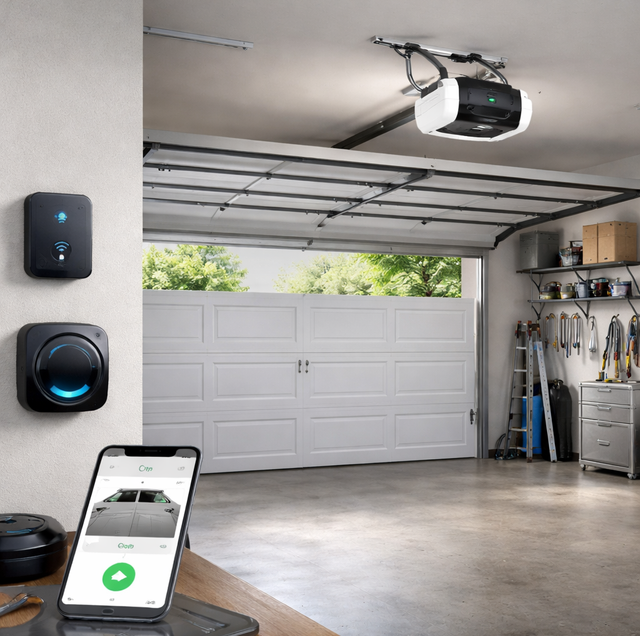
MyQ changes the layer underneath that interaction. A LiftMaster opener built for MyQ either has a Wi-Fi radio built into the unit itself, or it connects through a small hub wired to the opener's control terminals, and that radio joins your home network the same way a laptop or a smart thermostat does. Every command from the app travels from your phone to a cloud server and back down to that radio, not directly from your hand to the door. That round trip is what lets the door respond to a command sent from another state, but it also means the system depends on two things a basic remote never needed: your home's internet connection staying up, and the opener's Wi-Fi radio staying paired.
The difference feels less like trading a remote for a nicer remote, and more like trading a walkie-talkie that only reaches the next room for a phone number that finds you wherever you are.
What the Hub or Built-In Radio Actually Talks To
Openers built with LiftMaster's Security+2.0 protocol, most units sold in roughly the last decade, can add a myQ Smart Garage Hub: a small wall-mounted unit that pairs with the opener over the same RF channel a remote would use, then bridges that connection to Wi-Fi. It is not rewiring the opener's logic board; it is standing in as a capable universal remote that happens to also talk to a network. Newer LiftMaster models skip the separate hub because the Wi-Fi radio is built into the opener's control board from the factory, a more direct connection with one less physical box in the chain to fail.
Older openers that predate Security+2.0, or systems from brands MyQ does not pair with directly, generally cannot add this kind of hub-based connectivity, though a separate retrofit path exists for many of those situations and works around the pairing question entirely.
Multiple Users, Guest Access, and an Activity Log
A keypad outside the garage typically runs on one shared numeric code that everyone in the household, and every dog walker or contractor who has ever needed in, uses interchangeably. There is no way to tell who came through the door on a given day, and revoking access after a code has circulated means changing it for everyone who relies on it.
MyQ replaces that shared code with individual digital access tied to a phone number or account. Guest access: a code that expires after a set window, useful for a delivery, a contractor working one afternoon, or a house sitter covering a week. Activity log: a running record showing which door opened or closed, at what time, and, when multiple people are on the account, whose credential triggered it. That log is the piece a shared keypad code cannot produce on its own, because a keypad has no memory of who typed the numbers.
Cameras and Visual Confirmation
A standard opener tells you the door is open or closed through a position sensor and, at best, a status light on the wall control. A compatible MyQ camera adds a live video feed and short recorded clips tied to door events, so a notification that the door opened arrives with an actual image of what triggered it rather than a bare timestamp. That distinction matters for the specific concern MyQ is usually bought to solve: not "is the door open," a basic sensor already answers that, but "who or what opened it."
Scheduled Open and Close Times
MyQ can also run on a set schedule instead of waiting on a command from you. You can set the door to close automatically at a fixed time each evening, useful if the door sometimes gets left open after the last car pulls in for the night, or set it to open at a fixed time each morning for a dog walker or a cleaning service without handing out a code you have to remember to revoke later. The schedule runs through the same cloud connection as a manual app command, not a separate local timer built into the opener itself, so it depends on your home's internet connection staying up at the exact moment the schedule is set to fire. A schedule that gets missed because the Wi-Fi happened to be down that minute shows up in the activity log the same way a missed manual command would.
Where MyQ Connects with the Rest of a Smart Home, and Where It Does Not
MyQ supports Amazon Key for in-garage package delivery. At the moment of the drop, the courier scans the package, and Amazon's system asks the myQ cloud to open that one door, then close it again once the package is inside. The driver never holds a code or a remote for the door itself. Beyond that named partnership, treat any other platform as unconfirmed until you check the current list yourself: MyQ discontinued its own Google Assistant integration in 2023, and independent platforms such as Home Assistant have lost official access to MyQ's cloud data at points as the company has tightened who can connect to it. Apple HomeKit is not natively supported either. If a household already runs lighting, thermostats, and locks through one of those broader dashboards, the garage door is the piece least likely to show up alongside them without a manual workaround, so verify compatibility before assuming it will.
Standard Setup vs MyQ: A Side-by-Side Look
| Capability | Standard Remote & Keypad | MyQ-Connected Opener |
|---|---|---|
| Range | Limited to line-of-sight / driveway distance | Works anywhere there is a data connection |
| Access control | One shared code for everyone | Individual, time-limited access per person |
| Usage history | None | Timestamped activity log |
| Remote monitoring | None; status light only, on site | Push alert if the door is left open |
| Visual confirmation | Not available | Available with a compatible camera |
| Scheduling | Not available; each cycle needs a manual command | Can be set to open or close automatically at fixed times |
| Works without internet | Yes, by design | Wall button and paired remote still work; app commands do not |
| Setup | Plug-and-pair | Account, Wi-Fi credentials, hub or built-in radio |
Who Actually Gets Value from an Upgrade
The households that get the most from MyQ share a pattern: more than one person needs door access, packages or contractors show up when no one is home, or the garage functions as the main entry, where a door left standing open for twenty minutes is a real risk rather than a hypothetical one. A multi-user home with kids, dog walkers, or in-and-out foot traffic through the garage is exactly the situation a shared keypad code and a status light were never built to handle. A logic board that also has to weather large temperature swings and the occasional power blip from a storm benefits from that same visibility: an alert that the door never closed after an outage catches a problem a status light alone would not.
A single-occupant home, where one person parks, walks in, and closes the door behind them, gets less out of the connectivity layer. The RF link between a remote and the opener already does that job reliably, and adding a network dependency solves a problem that the household is not actually living with. That is the real decision: not whether the technology works, but whether the shared-access and after-the-fact visibility it adds is something your household needs or something it would simply carry along unused.
Frequently Asked Questions
No. The photo-eye sensors mounted near the bottom of the tracks and the auto-reverse function built into the opener's logic board operate independently of any app or Wi-Fi connection. They exist to catch an obstruction and reverse the door, and that loop is wired into the opener itself rather than layered on top of it, so it runs the same way whether or not MyQ is installed. A misaligned or blocked sensor stops the door from closing on an app command exactly the way it stops a wall-button command.
The wall button and any paired remote keep working, since they talk to the opener over the same local RF and wired connections a non-smart system uses. Two details are worth knowing beyond that. A status light on the hub, or on the opener's own panel, stops sitting steady and starts blinking when the Wi-Fi link drops, which is a faster check than opening the app to find out. And the activity log does not backfill: doors opened during the outage still open and close normally, but those events never land in the record, so an unexplained blank stretch in the timeline usually means the connection was down, not that nobody used the garage.
Yes. A household with a second bay, a detached shop, or a gate operator can typically pair more than one opener to a single account, and the app lists each door separately with its own activity log and access settings rather than blending them into one entry.
The Wi-Fi radio draws a small amount of continuous current to stay connected, but it is built to idle at a level the backup battery is sized to absorb alongside the motor's normal cycling. A shortened backup runtime is far more likely to signal a battery nearing the end of its own service life than any load from the radio itself.
A separate retrofit path exists for this: instead of pairing with the opener's own radio, a sensor mounted on the door track reads its position directly and a wired relay operates the existing wall-button circuit to open and close it. That approach sidesteps brand compatibility, but it also gives up some of the deeper integration a native Security+2.0 opener gets, including finer detail in the activity log.
Not quite, and the difference is deliberate. A wall button is an attended control: someone is standing there watching the opening, so the door moves the moment it is pressed. A command sent from a phone is unattended, and the opener treats it that way, sounding a warning tone and flashing its light for several seconds before the door starts moving so anyone standing in the bay gets notice first. That delay is not lag in the network; it is the opener holding the door still on purpose. The same warning runs ahead of a scheduled close, so a door set to shut itself at ten each night beeps and flashes first even though nobody touched a phone.
Whether MyQ earns a place on a given opener comes down to counting, not guessing: how many people need access, how often the garage functions as an unsupervised entry, and whether knowing about a door event after the fact is worth something to that household. For an opener already running Security+2.0, the upgrade path is usually a hub and an app rather than a full opener replacement, so weighing it does not have to be an all-or-nothing decision.
Find out if your opener can add MyQ — a quick compatibility check shows whether a hub upgrade or a new opener is the right path. That check folds into opener repair in Pflugerville when the unit is already acting up, and for a motor past its useful life it rolls into smart opener installation instead. Squared Away Garage Door Service serves Cedar Park and Central Texas. Call (512) 456-3781.
